Ollama JSONDecodeError: Extra Data? Two Fixes We Tested in Python
Ollama returned HTTP 200, but Python could not parse the answer. We reproduced the error and tested two fixes, with runnable code and recorded results.
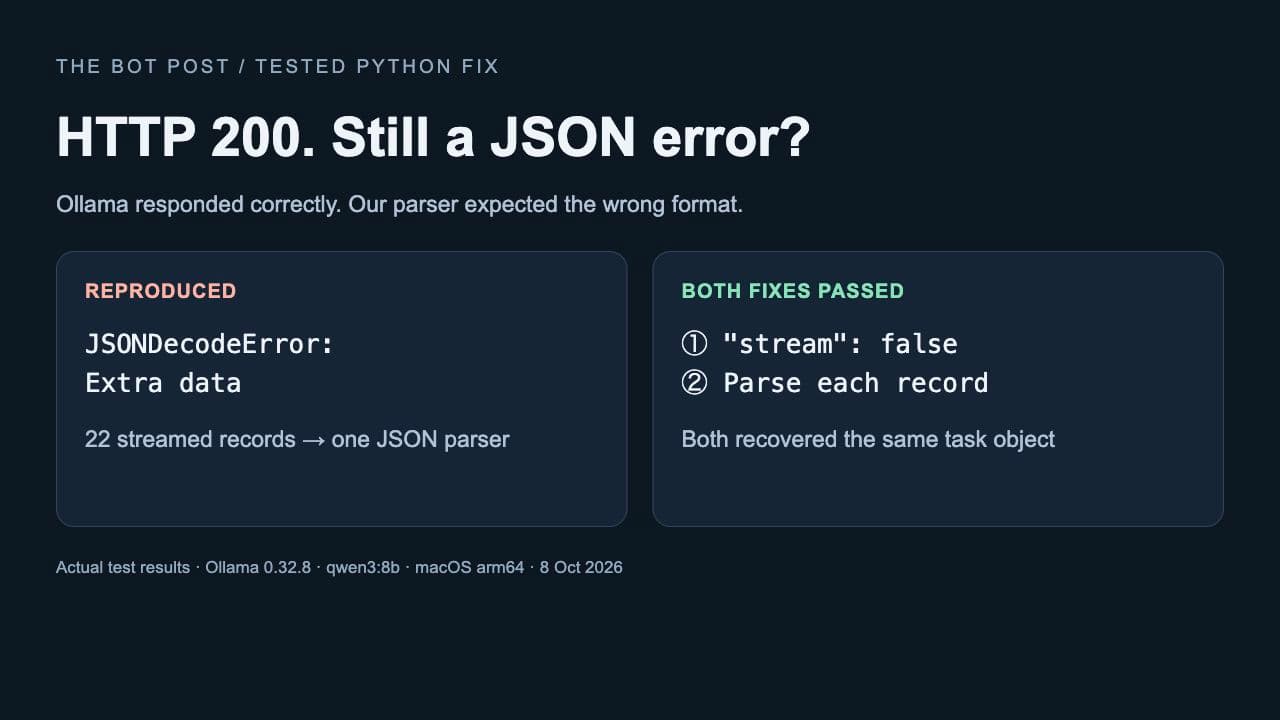
Your local AI model answers successfully. The HTTP status is 200. Then your Python script crashes with JSONDecodeError: Extra data.
We reproduced that combination with Ollama and found a specific cause: the server returned multiple JSON records, while the client tried to read them as one JSON document. The model was working. The response parser was expecting the wrong shape.
Quick fix: add "stream": false to the request body for /api/generate. Parse the HTTP response once. If you asked the model to produce JSON, parse the text inside its response field separately.
First, check whether this is your problem
This guide applies to a direct HTTP request to Ollama’s native /api/generate endpoint. Inspect the response body: if it contains several JSON objects on separate lines, a single json.loads(body) call is the wrong parser.
Ollama documents this default as newline-delimited JSON, or NDJSON. Setting stream to false requests one JSON response instead. See the official streaming documentation.
If the request never connects, start with our tested Ollama connection guide. A connection failure and a JSON parsing failure happen at different stages.
What we actually tested
On October 8, 2026, we made two local generation requests using Ollama 0.32.8 and qwen3:8b on macOS 26.6.1, arm64. Cloud features were disabled. An isolated server used port 11439; the examples below use Ollama’s usual port, 11434.
Both requests used this fictional note: “Priya will review the draft. No deadline was agreed.” We asked for an owner, task and due date, with a missing deadline represented as null.
- Default streaming: HTTP 200, followed by 22 separate JSON records. Parsing the entire body at once raised
Extra data: line 2 column 1 (char 94). - Streaming parsed correctly: reading each record and joining its text produced a usable object.
- Streaming disabled: one HTTP response object, followed by a successful parse of the generated text.
Both fixes recovered this result:
{
  "owner": "Priya",
  "task": "review the draft",
  "due_date": null
}
Read our recorded test results. This was a focused reproduction with one note and two requests, not an extraction-accuracy benchmark. We also replayed both captured response bodies through the exact example scripts below.
Fix 1: disable streaming for a small extraction task
For a script that needs one finished answer, this is the simpler option. You need a running Ollama server and the local model installed. Check ollama list; if qwen3:8b is absent, ollama pull qwen3:8b downloads it and requires sufficient disk space and memory. Our local AI setup guide covers the starting steps.
Save the following as ollama_json.py and run python3 ollama_json.py. It uses Python’s standard library, with no additional Python package required. The model name and think option match our tested model.
import json
import urllib.request

URL = "http://127.0.0.1:11434/api/generate"
SCHEMA = {
    "type": "object",
    "properties": {
        "owner": {"type": "string"},
        "task": {"type": "string"},
        "due_date": {"type": ["string", "null"]},
    },
    "required": ["owner", "task", "due_date"],
    "additionalProperties": False,
}
payload = {
    "model": "qwen3:8b",
    "prompt": (
        "Extract JSON from this fictional note: "
        "Priya will review the draft. No deadline was agreed. "
        "Use null for missing due_date. "
        "Return only JSON matching this schema: "
        + json.dumps(SCHEMA)
    ),
    "format": SCHEMA,
    "think": False,
    "stream": False,
    "options": {"temperature": 0, "num_predict": 120},
}
request = urllib.request.Request(
    URL,
    data=json.dumps(payload).encode("utf-8"),
    headers={"Content-Type": "application/json"},
)
with urllib.request.urlopen(request, timeout=120) as response:
    envelope = json.load(response)
if "error" in envelope:
    raise RuntimeError(envelope["error"])
if not envelope.get("done"):
    raise RuntimeError("Generation did not finish")
result = json.loads(envelope["response"])
print(json.dumps(result, indent=2))
There are two decoding steps for a reason. json.load(response) reads the API envelope, which includes generation metadata. json.loads(envelope["response"]) reads the JSON text the model generated. If you asked for ordinary prose instead, use that field as a string and skip the second parse.
Fix 2: keep streaming and read one record at a time
If your application needs streaming, keep the imports, URL, schema and payload above. Replace everything from request = urllib.request.Request( onward with this block:
payload["stream"] = True
request = urllib.request.Request(
    URL,
    data=json.dumps(payload).encode("utf-8"),
    headers={"Content-Type": "application/json"},
)
parts = []
done = False
with urllib.request.urlopen(request, timeout=120) as response:
    for line in response:
        if not line.strip():
            continue
        chunk = json.loads(line)
        if "error" in chunk:
            raise RuntimeError(chunk["error"])
        parts.append(chunk.get("response", ""))
        if chunk.get("done"):
            done = True
            break
if not done:
    raise RuntimeError("Stream ended before completion")
result = json.loads("".join(parts))
print(json.dumps(result, indent=2))
Each incoming record can contain only a fragment of the model’s answer. The code collects those fragments, waits for completion, and then decodes the assembled answer. It does not try to turn each fragment into the final task object.
Our original reproduction captured the whole streamed body before splitting it into records. We separately checked the line-iteration code above against that saved body. We did not measure streaming latency or test interrupted network connections.
Why asking for JSON did not prevent the error
Two different formats are involved: how the server transports its response, and what the model writes inside that response. In our baseline request, a JSON schema was already present in format. The HTTP body still arrived as multiple records because streaming remained enabled.
For structured output, Ollama accepts a schema in format. Its documentation also recommends including the schema in the prompt and lowering temperature. As of our check, Ollama Cloud does not support structured outputs; this example uses a local model. See Ollama’s structured-output guide.
Our example explicitly allows a missing deadline. That matters: a neat JSON object containing an invented date would still be a bad result. Before using extracted information in a real workflow, validate its fields and compare important values with the source. Successful parsing alone does not establish factual accuracy.
If it still fails, check where it fails
- The first decode fails: inspect the HTTP status and response body. Multiple complete objects suggest a framing mismatch; HTML or an error page suggests a different response source.
- The second decode fails: inspect the generated text. Check for an incomplete answer, an insufficient output limit or content that does not match the requested format.
- You use
/api/chat: its generated text is inmessage.content, so do not copy theresponsefield access unchanged. Check the chat endpoint reference.
Do not solve “Extra data” by keeping only the first line or deleting all newlines. The first record may contain only the beginning of the answer; removing separators still leaves multiple JSON objects. Python’s JSON documentation explains that JSON is not a framed protocol.
For this small task, we would use the non-streaming version: fewer parsing steps and one finished object to inspect. Keep the streaming version when your application actually needs incremental delivery.
Testing and sources: The Bot Post’s local reproduction, October 8, 2026; official Ollama API and structured-output documentation; Python JSON documentation. Commands and findings apply to the environment stated above.
About the author
UbedullaFounder & Editor
Founder and editor of The Bot Post, covering AI news and technology.